 Roser Bernabé
Turning payroll's biggest bottleneck into a new business line
Factorial Professionals is the portal I designed for payroll bookkeepers (gestorías) to receive, manage and close every payroll incident from all their clients in one place. Instead of replacing bookkeepers like most competitors, we made them partners, and they became a growth channel for Factorial.
- 10xincidences sent through the platform
- −70%payroll errors
- +50%process efficiency
- 2business lines unlocked
Context
Factorial is an all-in-one HR platform for SMBs. Most of those SMBs don't run payroll themselves: they outsource it to an external bookkeeper (in Spain, a gestoría or asesoría laboral).
Every month, dozens of HR events change what an employee should be paid: a medical leave, a new hire, a shift change, a bonus, a new bank account. All of that data already lived in Factorial. But it reached the bookkeeper the old way: by email, in spreadsheets, often days late.
Payroll is unforgiving. It is legally regulated, it handles highly sensitive data, and everyone expects to be paid correctly and on time. A small mistake becomes a big trust problem.
The problem
Payroll incidents traveled by email and Excel, and that broke the process in three ways.
Wrong data
Typos, missing fields, copy-paste from HR tool to email to payroll software.
Employees paid wrong; compliance risk.
Late data
Leaves and hires reported days after they happened, no real-time status.
Last-minute rush before the payroll cut-off; employees paid late.
Scattered data
No single history, no audit trail, sensitive data sent over email.
Hard to audit, security risk, knowledge lost when someone leaves.
Our first fix created a new problem. We started by giving bookkeepers access to each client's Factorial account, with a section showing that employee's payroll changes. It worked for one client. But a bookkeeper serves dozens of companies, on different tools. One login per client meant more chaos, not less.
That was the real problem to solve: bookkeepers needed one place to work across all their clients.
The strategic insight
Don't replace the bookkeeper. Make them a partner. Competitors saw gestorías as a cost to remove. We saw them as the people who already had the trust of thousands of SMBs.
So we stopped designing a feature inside each client's account and designed a product for the bookkeeper: one portal to manage every client. That turned one tool into two business lines.
Partners bring new companies to Factorial, and every new company makes the portal more valuable for partners.
Competitive landscape
Every alternative either ignored the bookkeeper or tried to remove them. None made them a partner.
| Alternative | How it works | Weakness | Our angle |
|---|---|---|---|
| Excel + email | Still the default for SMBs and bookkeepers | Flexible but error-prone, insecure, untraceable | Kill email, kill Excel |
| Legacy payroll software with employee portals | Payroll vendors bolt on HR portals for bookkeepers to resell | Dated UX, not built for modern HR | Modern, easy HR software |
| Payroll-as-a-service (Payfit-style) | Run payroll for the SMB directly | Cuts the bookkeeper out, so bookkeepers push back | We partner with them |
| Other HR platforms | Pre-payroll exports and integrations | Built for the company only, not the bookkeeper | A dedicated bookkeeper product |
Our positioning: the only modern HR platform that brings bookkeepers in instead of cutting them out.
The design challenge
How might we get the right data to the bookkeeper, at the right time, in the right format, without anyone sending an email?
I turned that into four principles that guided every decision:
Zero re-typing
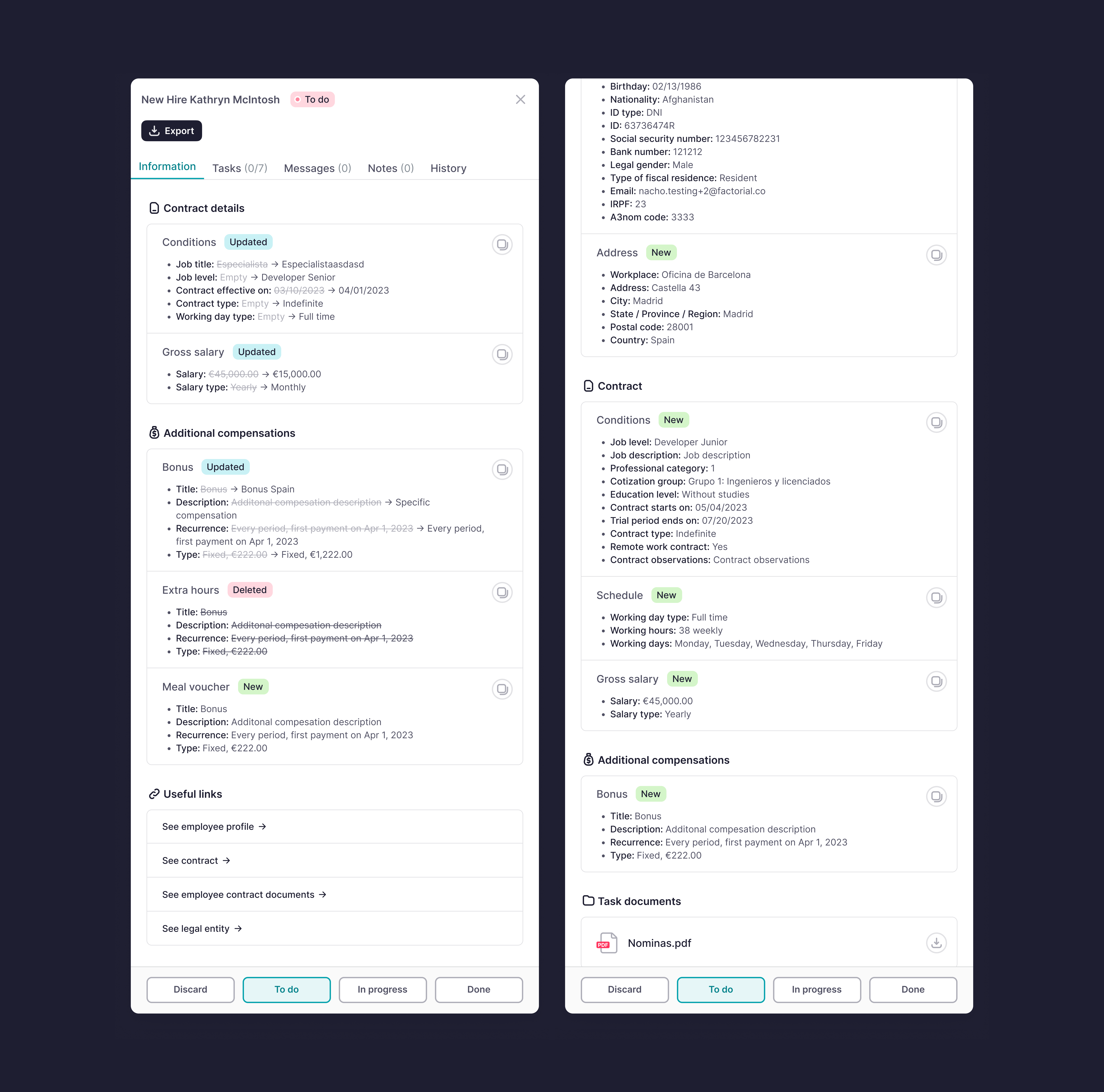
Any change in Factorial (a leave, a termination, a new IBAN) automatically creates a payroll incident with all the data attached.
The bookkeeper never needs the client's account
Everything needed to process an incident lives in the portal.
Shared truth
Company and bookkeeper see the same incident and the same status. No more “did you get my email?”
Built for volume
Designed for someone handling hundreds of incidents across dozens of companies, not for one HR manager.
Phase 1: an MVP scoped to absences
We launched with one incident type only: absences (medical leave, maternity and paternity leave, holidays). It was a deliberate bet.
Why absences first
- They are among the incidents bookkeepers track most.
- They were already well modeled in our backend: it is clear when an absence is requested and approved.
- Other incidents (new hires, contract updates) raised a hard question: when is this data ready to send? Absences avoided that “snapshot” dilemma, so we could build a better first product and show the bookkeeper our end goal.
Bookkeeper dashboard
One row per incident, across all clients, with filters to see and manage workload at a glance. Every detail needed to process it is right there.
Company view
A simple table showing the company exactly what the bookkeeper receives, plus the statuses the company controls (In preparation, To do, Discarded).
Shared status
Both sides follow the same incident from creation to processed, instead of chasing each other by email.
Phase 2: from MVP to platform
Once clients saw value, we used their feedback to turn a visibility tool into a full workspace for payroll. The bookkeeper could now report status, talk to the client and attach documents, without a single email.
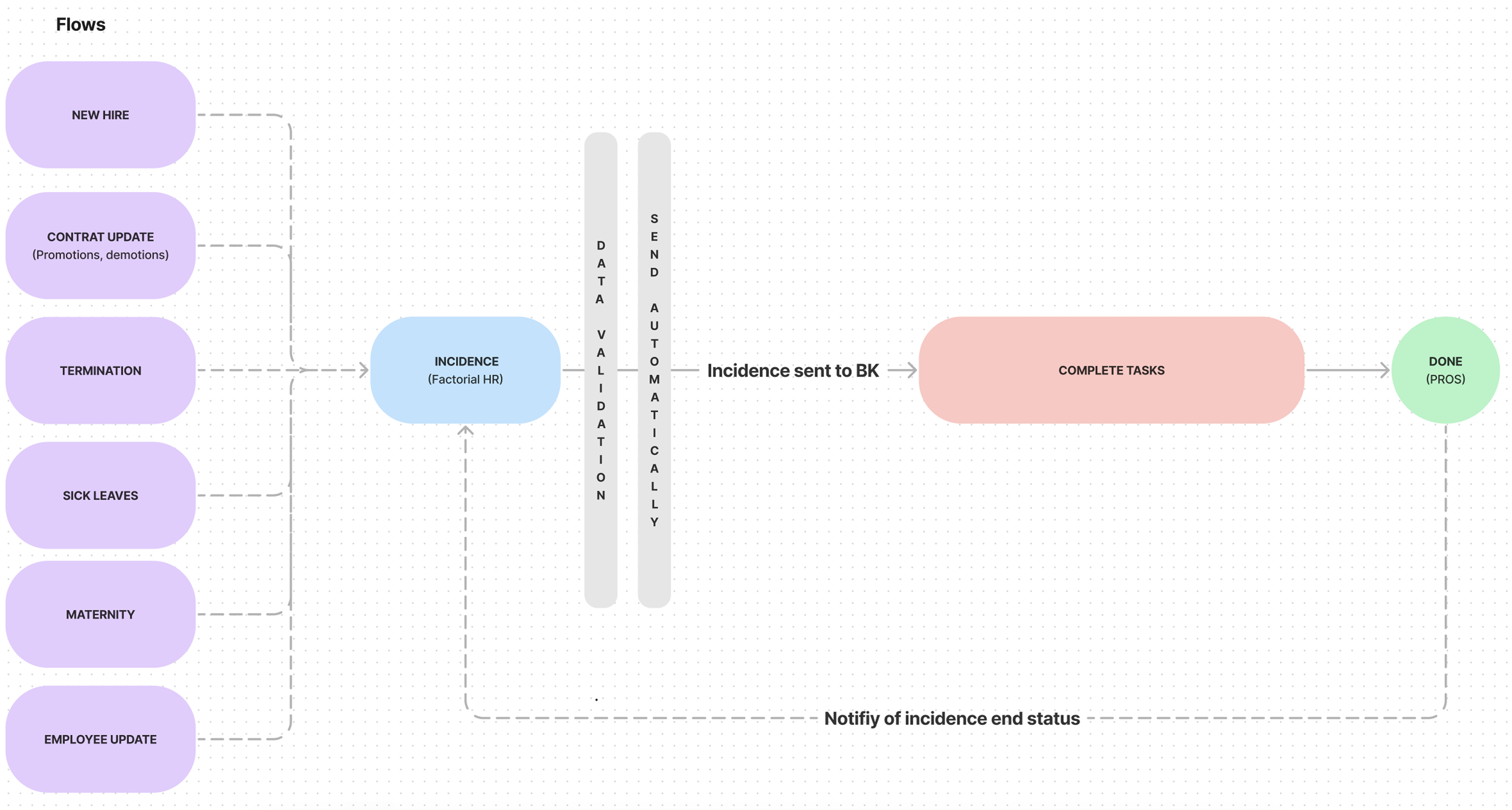
All incident types
New hires, terminations, contract updates, employee data changes, salary supplements, shift changes.
One place for everything that affects payroll.
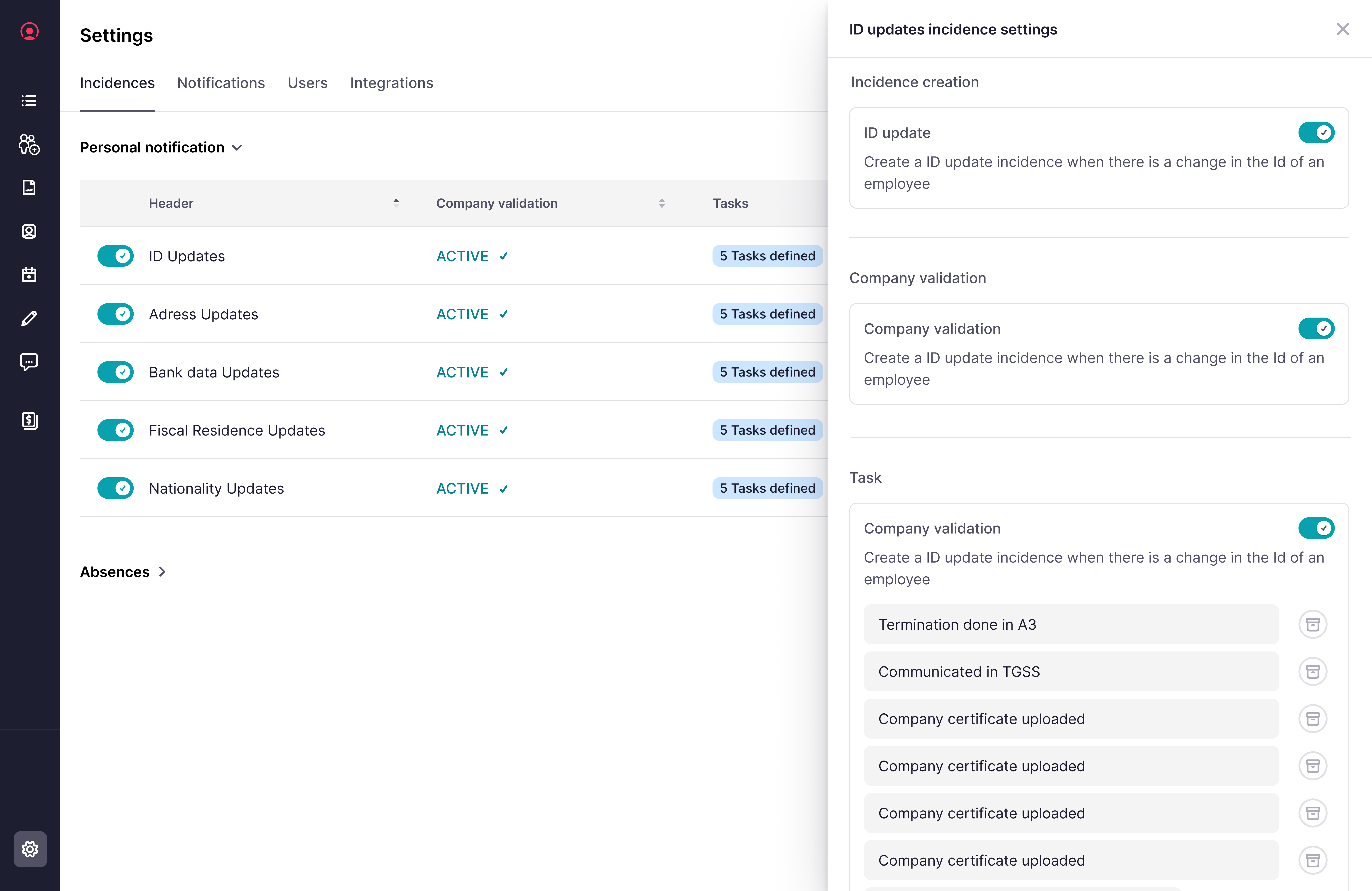
Configurable workflows
Each company and bookkeeper defines which incidents are sent, what data they must contain, and when.
Payroll differs by firm; one fixed flow didn't fit.
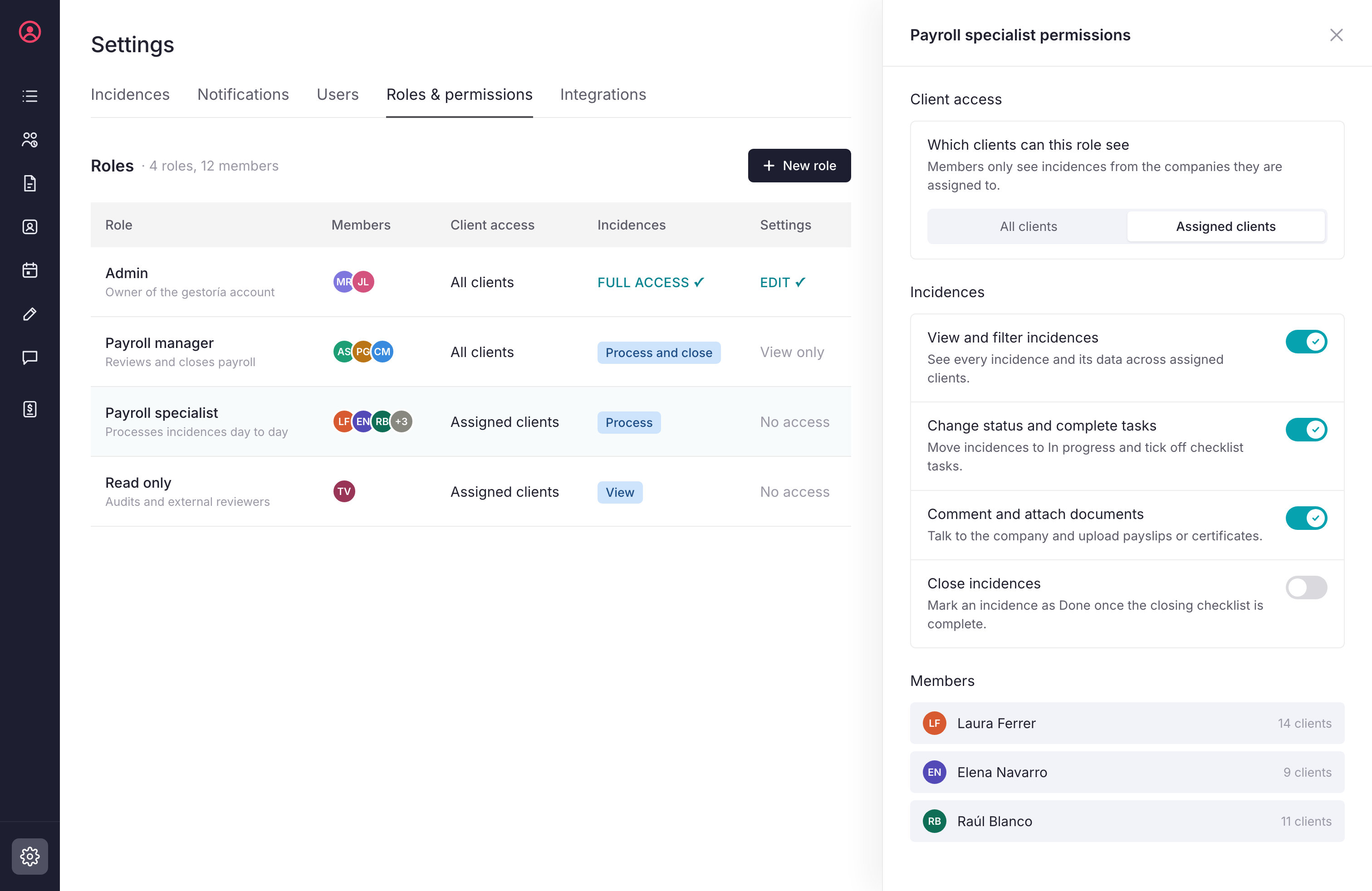
Collaboration
Multiple bookkeepers per client, task owners, comments and observations, attachments.
Gestorías work as teams, not individuals.
The hardest design problem was configurability without complexity: giving each firm control over its own rules while keeping the daily view as simple as an inbox.
Key decisions and trade-offs
These are the calls that shaped the product, and what we gave up for each.
| Decision | Alternative we rejected | Trade-off we accepted |
|---|---|---|
| A separate product for bookkeepers, not a section inside each client's account | Keep improving per-client access | More to build, but it unlocked multi-client work and the partner model |
| Start with absences only | Launch all incident types at once | Less value on day one, but a reliable MVP that proved the vision |
| Incidents generated automatically from HR events | A form where HR reports changes | Harder data modeling, but zero copy-paste and fewer errors |
| Same incident, two views (company and bookkeeper) | Separate flows per side | Status logic had to work for both, but we got one shared source of truth |
| Configurable rules over one standard flow | A single “best practice” workflow | More settings to design, but it fit how real firms work |
Impact
Professionals became more than a feature: it opened a new business line for Factorial.
- 10xincidences sent by companies through the platform
- −70%payroll errors
- −50%time spent managing payroll incidents
- −50%security incidents linked to payroll
- +35%positive user feedback
- +15new clients onboarded through the tool
Two growth loops from one product
Bookkeepers adopted Professionals to centralize their work and recommended Factorial to their clients. Companies chose Factorial because it made working with their bookkeeper effortless. Professionals is now a core benefit of Factorial's certified partner program for gestorías.
What I learned
- Understand the process before designing the screen: Payroll is a web of habits, laws and exceptions. The biggest wins came from mapping how firms really work, not from the UI.
- Design for the user who isn't paying: Bookkeepers weren't our customers, yet making them successful was what brought customers in. Some of the best business ideas sit with a secondary user.
- Control builds trust: Companies need to feel in control of something this sensitive. Clear statuses, visibility and an audit trail mattered as much as speed.
- Scope is a design tool: Starting narrow with absences let us earn trust and learn fast before tackling the messy incident types.
- Test, then test again: Users were patient with technical hiccups, but only because we tested constantly and fixed fast.